The digital company canteen: meal orders and payments without the paperwork

Zelo ERP automates meal booking, from each employee’s order to the summary sent to the supplier, and keeps employee meal accounts in order. Orders, payments and reporting on company canteen costs live in one module. Nothing gets handled manually.

Request a free demo
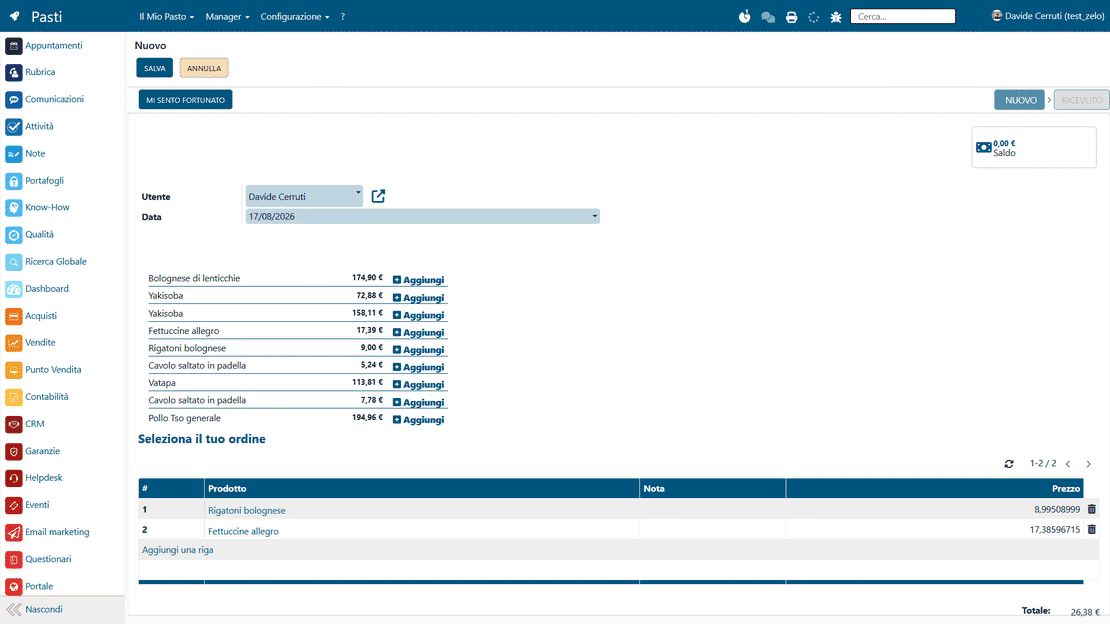
Zelo ERP Meals module: an employee orders lunch from the supplier menu while the meal account balance updates

Lunch under control: fewer errors for the company, steadier service for clients

With clear orders and accounts that stay current, errors and stress drop. Payments are tracked too, so the team works calmly and clients keep getting their service.

Total control over company meals, without errors

The Meals module in Zelo ERP puts an end to mixed-up orders and to the month-end dispute over who owes what. Every meal becomes a record: you can see each employee’s orders and spending in real time, plus what the company owes each supplier.

  • Digital orders for every employee, no manual entry
  • Each user’s meal account stays up to date
  • Orders grouped by supplier, with the aggregated amounts
  • Employee payments recorded centrally in Zelo ERP
  • Automatic notifications on ordering times and product availability
A calmer lunch break that clients notice

When meal orders in the company are clear, clients notice the better organization. The team gets its break back, with less stress and more time for client work and for the projects that really matter.

  • Staff come back from lunch on time and focused
  • Fewer interruptions during the day to sort out canteen matters
  • Clearer internal communication about meal times
  • A more satisfied team and a calmer workplace
  • The service to the end client keeps running without gaps

How meal management works

Set up the menu and the suppliers once, then let employees order in a few clicks. Accounts and deliveries stay under control from the same screen.

1. Configure

The manager sets up product categories, the meal price list, suppliers and payment rules in Zelo ERP. From that moment, meal orders in the company follow the same standard flow.

2. Order

Every employee opens the Meals area, picks their lunch from the menu, adds notes if needed and confirms the order in a few clicks from the company PC.

3. Control

The manager sees orders grouped by supplier or by employee, follows deliveries, records payments and keeps each user’s meal account current, all inside the company ERP software.

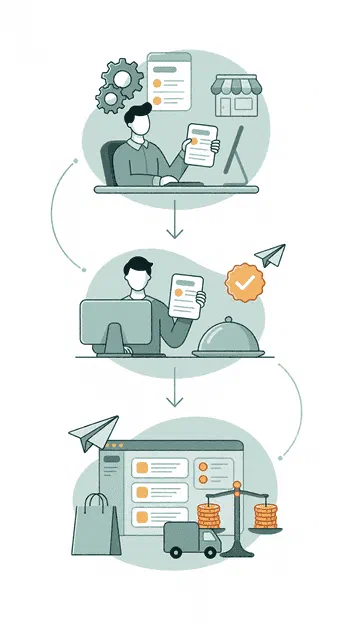
Zelo ERP Meals module workflow in three steps: menu setup, employee order and account control

Digital order management

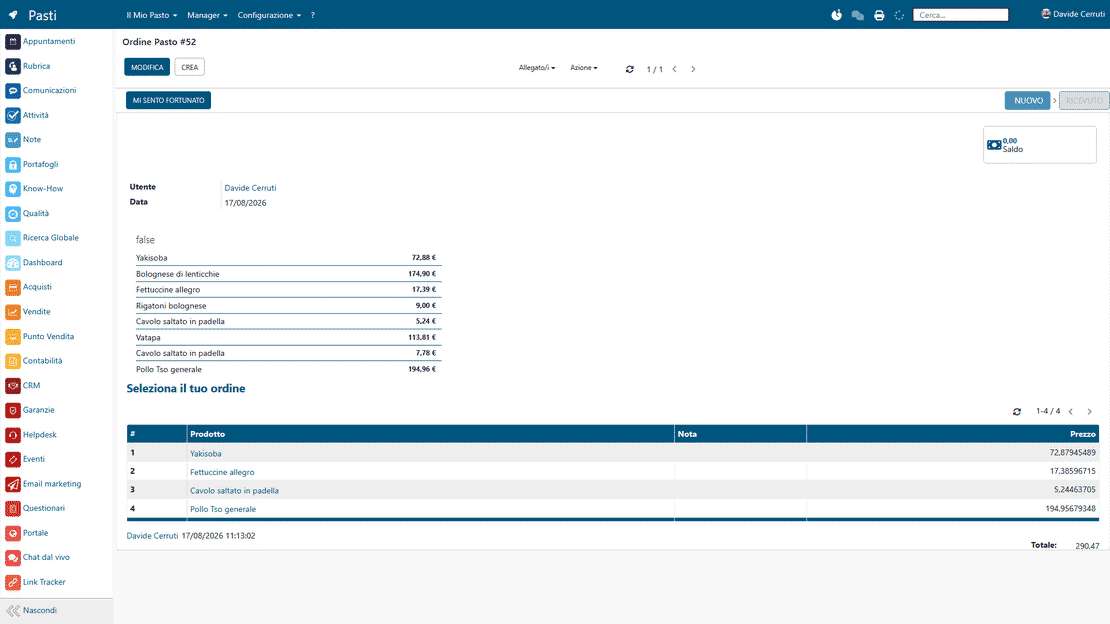
Employees select products from the predefined categories and add notes for the kitchen or the external supplier when needed. The up-to-date price list is always visible, together with the variants available for each dish in the database. Individual preferences get collected digitally, instead of by word of mouth or on paper.

Digital order management in Zelo ERP: an employee picks a meal from the menu and adds notes for the supplier
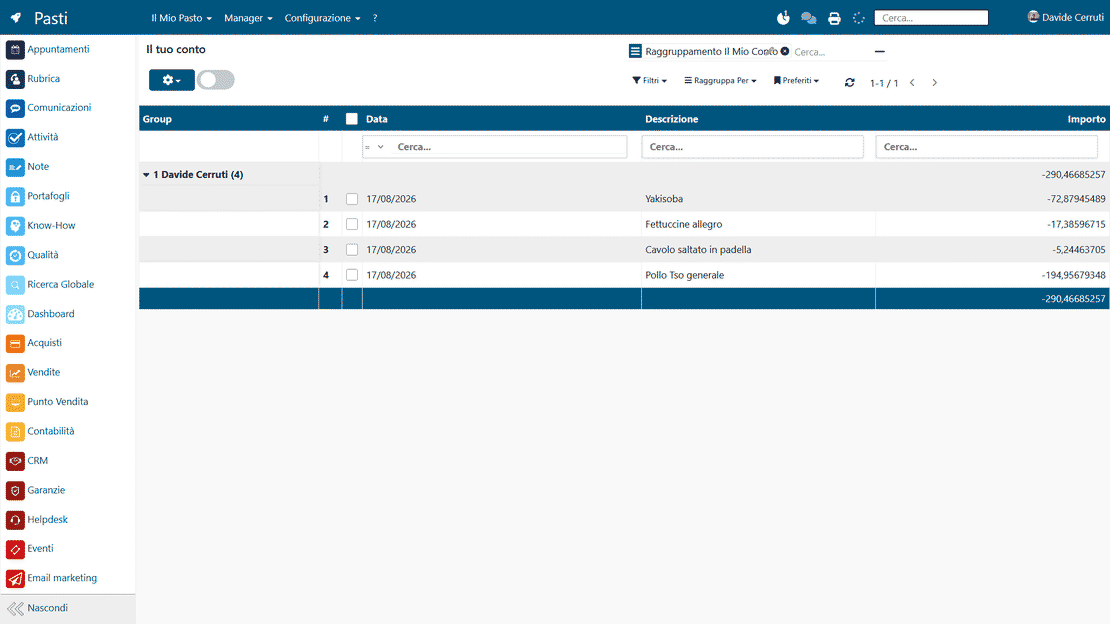
User balance monitoring in Zelo ERP: each employee's meal history and the amount left to settle

User balance monitoring

Every employee can check the detailed history of their meals and the total accrued over the period, at any time. The data is transparent: the remaining debt or the available credit on the profile is always visible. Every new order confirmed inside Zelo ERP updates these amounts automatically.

Supplier order aggregation

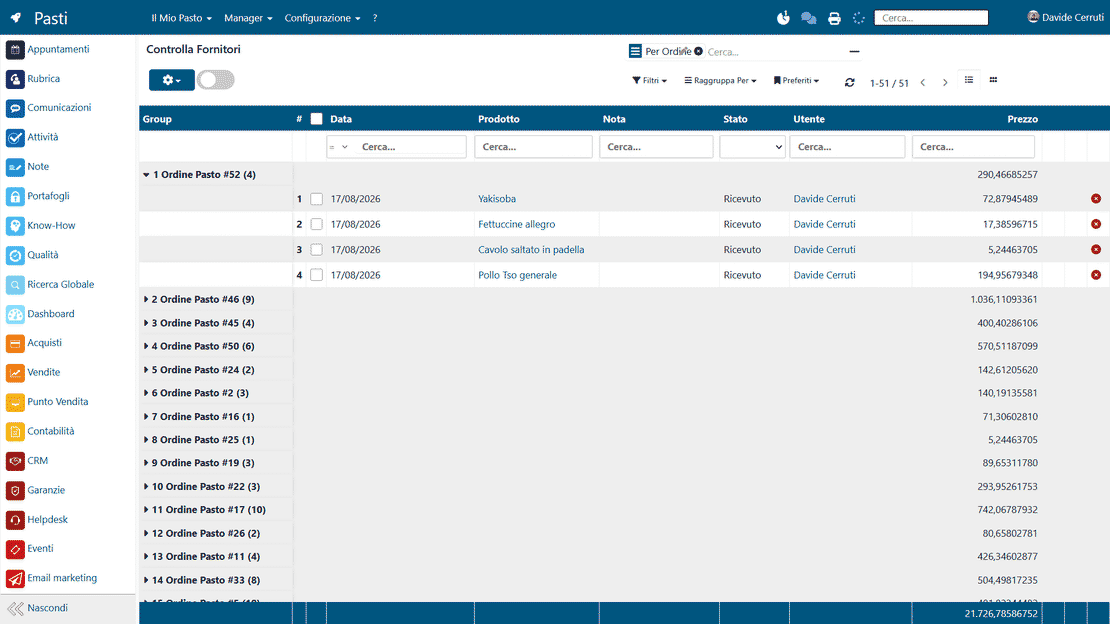
The software groups the day’s employee requests by supplier, category or single product. From this one view the manager reads off the overall order and sends it to the bar or the catering service. Counting errors become rare, and checking the delivery at arrival goes faster.

Order aggregation by supplier in Zelo ERP: the summary of meals to order from the bar or the catering service
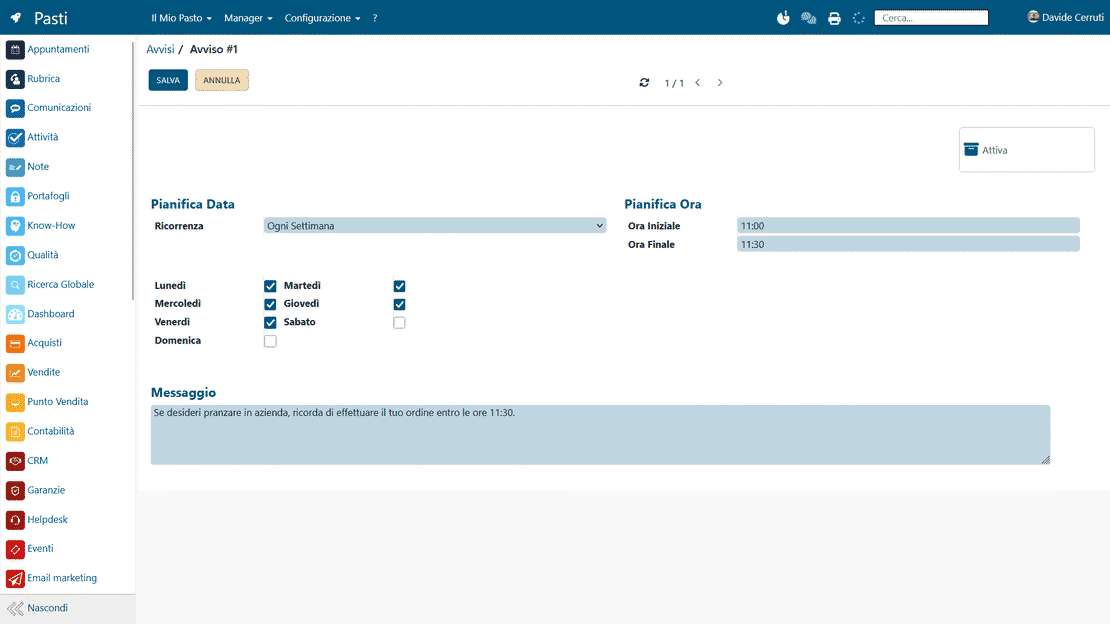
Automatic notifications in Zelo ERP: a reminder before the lunch order deadline and a notice when the supplier delivers

Automatic notifications and alerts

The company can schedule automatic reminders telling employees when ordering opens and closes. Each reminder can repeat daily or weekly, so everyone gets their request in on time. The timing follows the agreements with the external suppliers on meal preparation and delivery.

Account payments management

The module records the payments made by employees and reconciles them with the orders right away. The financial data can flow into the general accounting processes at several levels, which keeps tax management precise and orderly. Settlement methods vary, from payroll deduction to direct payment. Every movement leaves a trace.

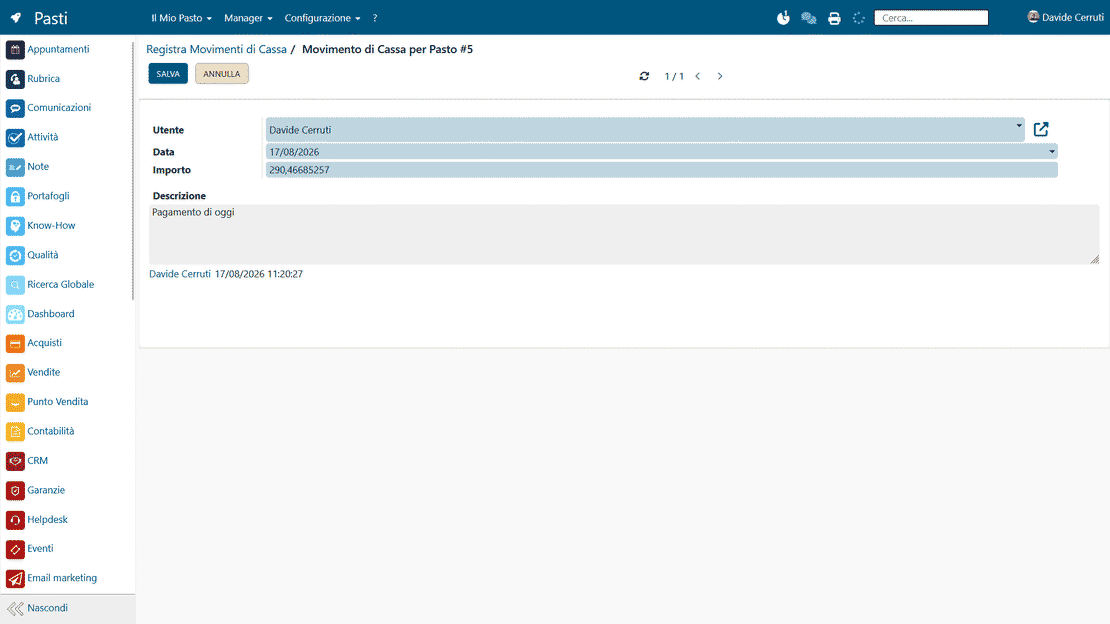
Account payments management in Zelo ERP: collecting meal amounts and keeping each employee balance up to date

5 questions about the
Company Meals Management module

Straight answers on how the module works, what it integrates with and what it costs.

Zelo ERP has a dedicated Meals area. Every employee opens the “My Meal” section and creates a new order, picking from the products on the company menu and adding notes if needed (intolerances, preferences). The system records the date, the user and the product details on its own, and updates the employee’s personal account in real time. From the Manager area you see today’s orders, grouped by supplier or by employee. You can also compare what was ordered with what was actually delivered. When the employee pays, or the amount comes off the payroll, Zelo ERP records the movement in the account and adds it to the history. The whole flow stays documented and easy to check.

Yes. The module was designed for micro-enterprises and SMEs that run a company canteen, or have arrangements with external bars and restaurants, and want to keep it simple. There is no infrastructure to set up: the Zelo users already in the company are enough. Even with a handful of employees the benefit is immediate, because it replaces order collection by chat, manual spreadsheets and rough end-of-month accounts. As the company grows, the same tool scales to multiple suppliers, differentiated menus and different payment policies. And since it lives inside Zelo ERP, the meal data works together with HR, accounting and reporting instead of staying in a separate app.

Every order generates a line in the employee’s account. From the “My Account” section the user sees the details of the meals consumed and the balance left to settle. The manager, from the “Account Control” and “Employee Payments” views, records payments made in cash, through payroll deduction or with whatever other method the company has defined. Once recorded, the amount comes off the employee’s account. Disputes become rare and the data lines up with the general accounting of the company ERP software without manual rework.

Yes. In the Meals module you define products and associate each with a supplier: restaurant, delicatessen, bar or delivery service. When employees place their orders, Zelo ERP keeps the link between product and supplier. The Manager area has views such as “Today’s Orders” and “Orders by Supplier”, where you quickly see what to order from each supplier and in what quantities. You can also track what was ordered against what was delivered, and print the lists when needed. Even with several external suppliers, meal order management stays orderly.

With a spreadsheet everything is manual: every change takes time, entry errors are frequent and employee accounts update slowly, when they update at all. The Zelo ERP meal management tool collects orders on its own, links every meal to a user, updates the account automatically and gives you managerial views by supplier, date and product. You can set up categories and ordering-time notifications, record payments and keep a detailed history. And because it runs inside the company ERP software, the data works with accounting, HR and reporting. In short: less manual work, fewer errors and a clear view of what the company canteen costs.

Tools integrated with the
Company Meals Management

Every tool below is already part of Zelo ERP.
No license cost for installed modules, number of users or enabled workstations.

call to action

Digitize your company canteen today

Orders and payments inside one system. Talk to our Business Analysts and see the module at work.
Request a free demo