Plan and track every project and job: timelines, costs and margins under control

Zelo ERP’s project management module brings the planning, execution and economic analysis of your company’s jobs together in one place. Track hours, manage deadlines and connect sales orders with the technical work that follows. At any moment you know where each job stands and what margin it’s earning.

Request a free demo
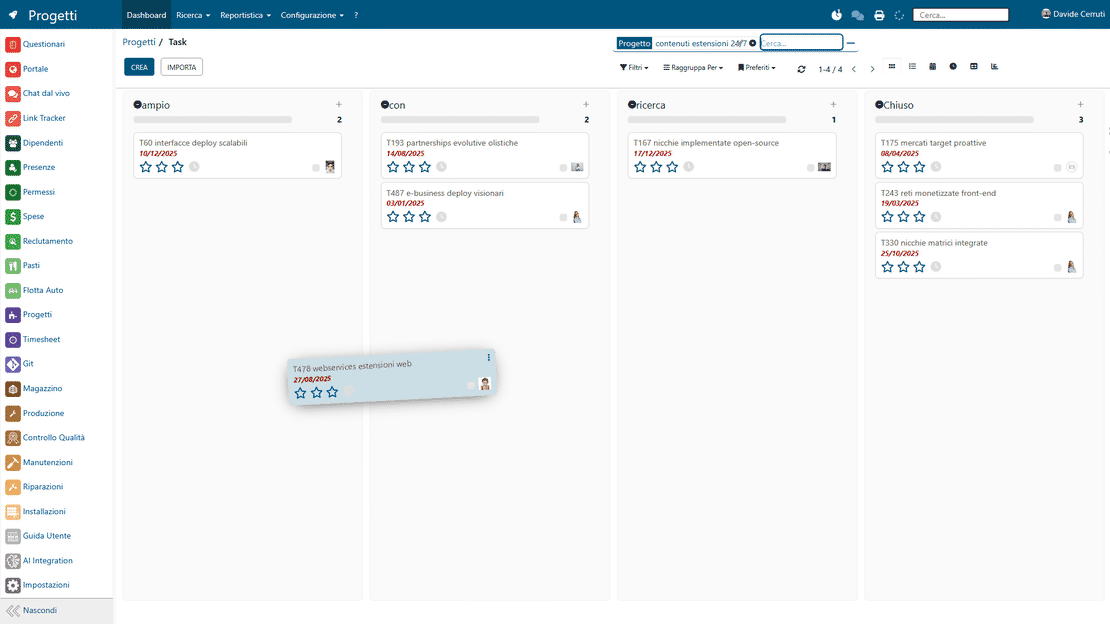
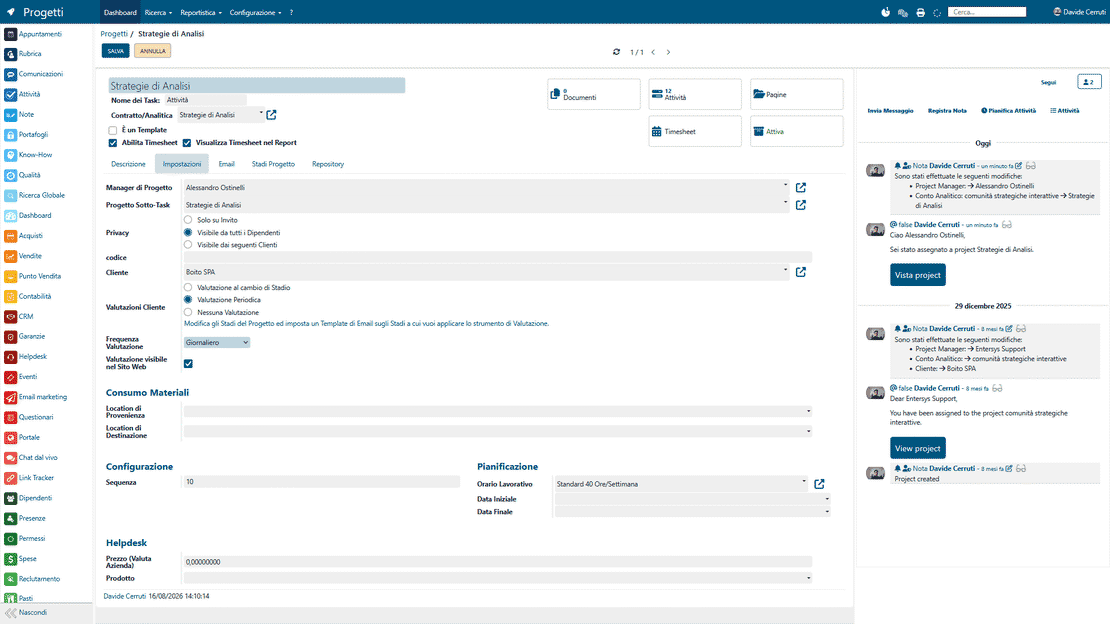
Zelo ERP Project and Job Management module: task kanban board with job progress tracking

Every project and job under control, from planning to delivery

Plan tasks, timelines and costs in one environment. Your company wastes fewer hours and misses fewer deadlines, and customers get deliveries and updates they can check.

Plan and measure every job: tasks, timelines, costs and margins

Zelo ERP lets you plan, track and measure every project: tasks, timelines, costs, materials and customer feedback stay in one management system. You reduce delays, overloaded teams and untracked hours, and the services you sell become more profitable.

  • Customizable project kanban for each business flow.
  • Timesheets on tasks and projects, linked to analytic accounts.
  • Gantt-style timeline with dependencies and workloads.
  • Projects created automatically from sales orders.
  • Detailed reports on hours, margins and team performance.
On-time deliveries and communications customers can follow

When you coordinate projects better, customers see punctuality and continuity of service. Zelo ERP keeps communications attached to each task, cuts oversights and gives every project a professional image from kickoff to delivery.

  • Deadlines met through planning everyone shares.
  • Communications tracked on every task and project.
  • Structured feedback with integrated customer ratings.
  • Clear visibility on progress and completed work.
  • Faster replies through tasks and followers.

Three steps toward profitable jobs

Plan, execute and analyze every job in a guided flow. A few clear steps keep timelines, costs and results under control.

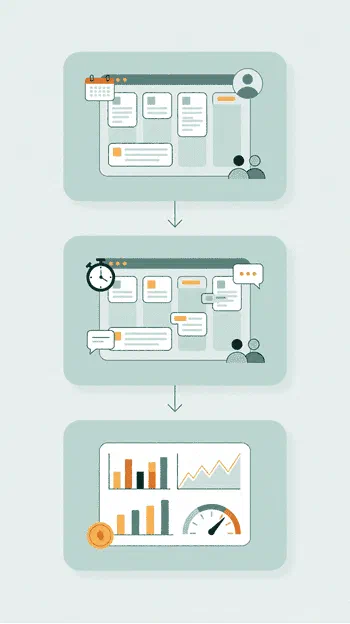
1. Plan

Set up projects with kanban phases, Timeline, analytic accounts and responsibilities. You link the customer, set the deadlines and decide how time is counted.

2. Execute

Manage tasks in the kanban, assign priorities, log timesheets and collaborate through chatter, subtasks, dependencies and recurring tasks.

3. Analyze

Check progress, planned vs. actual hours, per-project margins and team performance with reports and list views.

Zelo ERP project workflow in three steps: plan, execute, analyze

Task boards that show the work at a glance

Boards and customizable kanban views split the work into operational phases and make priorities visible. Each column can trigger automatic actions when a task changes stage, such as sending an email or closing the task. On every card you immediately see the assignee, the colored tags, critical deadlines and how urgent the activity is.

Project management in Zelo ERP: task kanban view with customizable progress stages
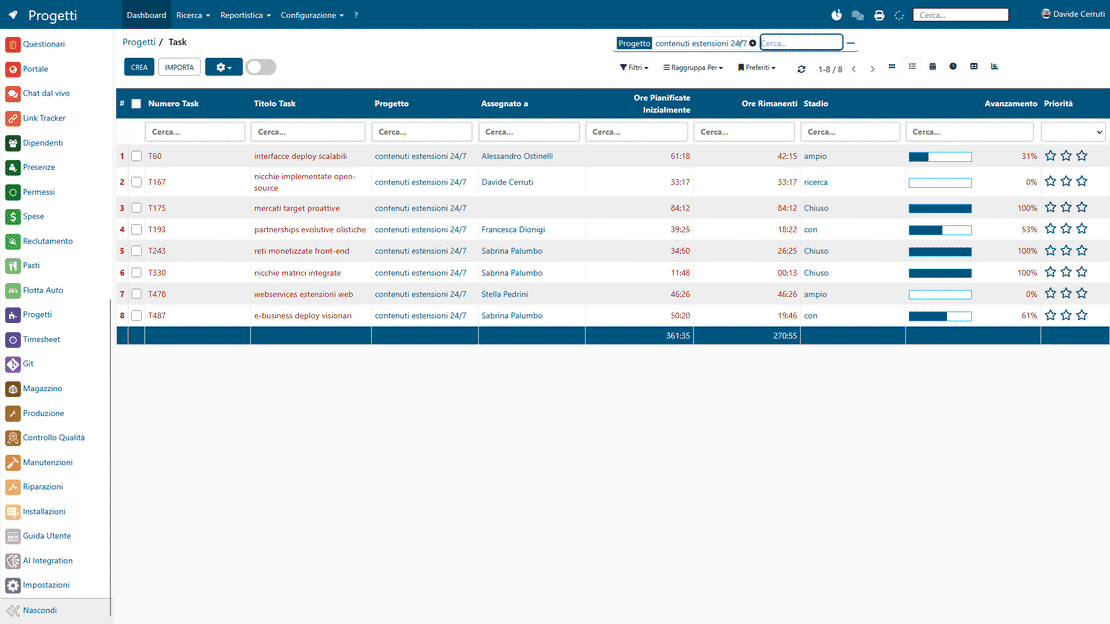
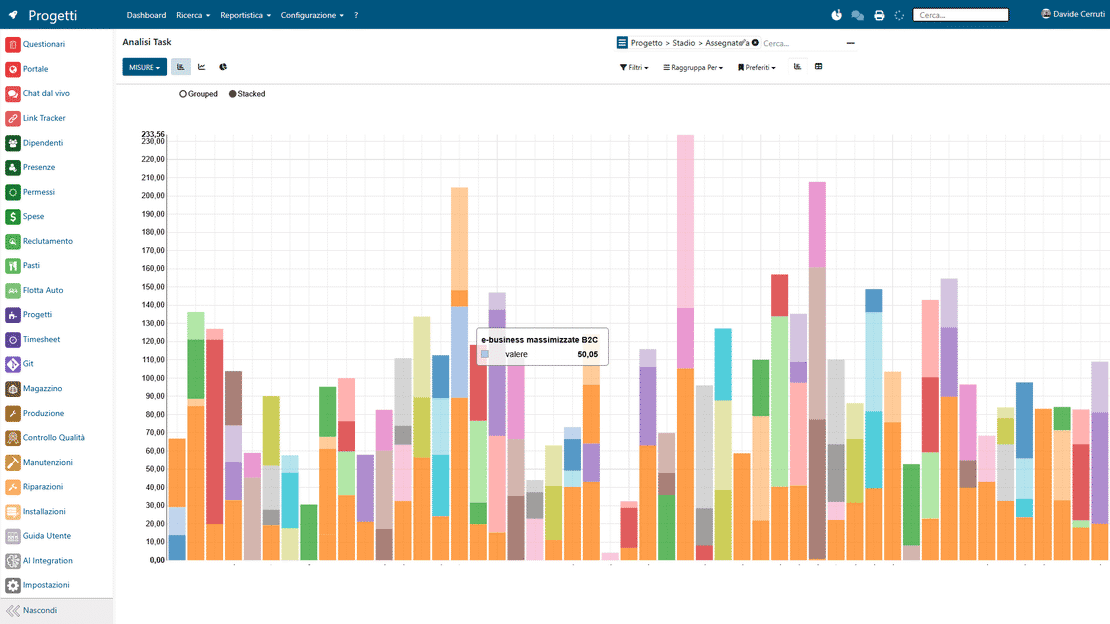
Time and profitability in Zelo ERP: planned vs. actual hours and per-project margins

Hours and margins on every job

Timesheets link to analytic accounting, so you can compare planned hours with hours actually worked and calculate margins. You record time with start and stop buttons as you work, or enter completed sessions by hand. The data feeds detailed reports that chart the progress of each activity and show what every resource costs the project.

Gantt-style planning on the Timeline

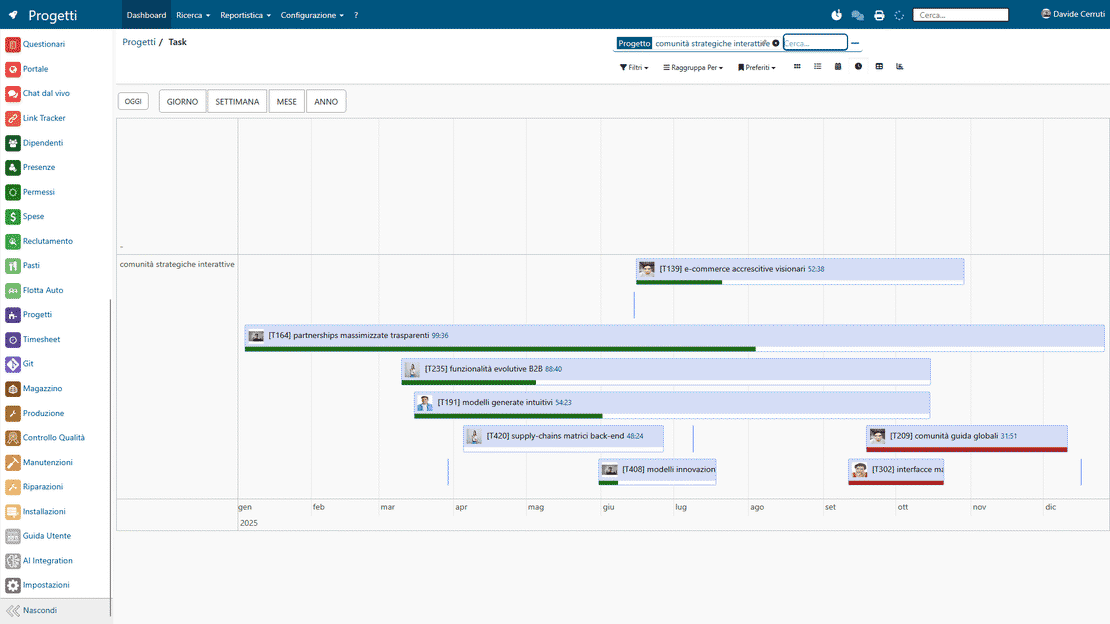
The Timeline view manages deadlines, workloads and dependencies between tasks with logic similar to a Gantt chart. You drag activities to move them and group them by project or by operator, so overlapping assignments stand out immediately. Reading the chart also makes it easier to forecast the final delivery date.

Gantt-style timeline in Zelo ERP: deadlines, dependencies and task workloads
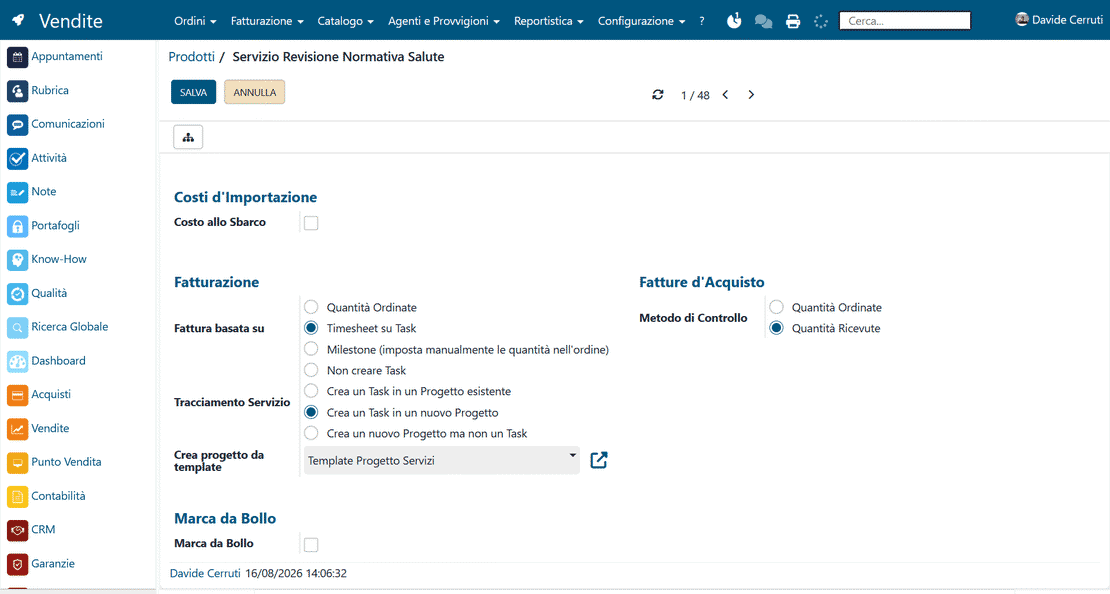
Sales flow in Zelo ERP: projects and tasks created automatically on order confirmation

From order to project, without double entry

When a sales order is confirmed, the system generates a project or individual tasks from the order lines, keeping the commercial side and the operational side connected. Configure a product as a service and the specific activities are created as soon as the customer confirms the quote. The work reaches the operational team already set up, with nothing to type twice.

Collaboration and feedback

The chatter, followers and automatic rating requests keep internal communication and customer opinions in one place. Every task holds its full history of messages, internal notes and attachments, accessible to all authorized members. Quick icon-based surveys let you check customer satisfaction as the project moves through its phases.

Customer feedback in Zelo ERP: satisfaction rating and collaboration on project tasks

5 questions about the
Project and Job Management module

Straight answers on features, integrations and costs.

Zelo ERP is designed for micro, small and medium-sized businesses that manage internal projects or projects for customers: professional firms, software houses, marketing agencies, consultants, service companies and manufacturers with complex projects. Project management includes the board, kanban view, calendar, Timeline and analytic accounting. You can start with a simple setup and grow over time without overhauling your processes: set up phases, assign tasks, log hours and read clear reports on progress and margins. If your projects currently live in scattered Excel sheets and emails, this is the step up to a real project management system for small and medium businesses, inside your ERP.

Every project in Zelo ERP gets a dedicated analytic account, linked to the timesheets logged on projects and tasks. You plan the initial hours, record time spent and compare planned vs. actual hours through progress bars and reports. Timesheets can be entered from the project, from the task or from the general Timesheet area, with the hours calculated automatically between start and stop. So you always know the team’s real commitment and the profitability of every job. Timeline and calendar help you spot overloads and delays early and replan quickly.

Yes. Configure products of type “Service” and, once the sales order is confirmed, they automatically generate a task or an entire project. You can link them to an existing project or create a new project referencing the order. The generated task comes with the customer and the correct analytic account attached, ready for timesheet logging. Fewer manual entry errors, a direct link between sales and project management, and the option to bill on the hours actually spent when that suits the job.

Every project and task has a dedicated chatter, followers and configurable notifications. You decide who follows what and which notifications they get: discussions, activities, status changes, ratings. Documents, images and notes can be attached from the task or the chatter, tasks can carry cover images, and collaborative Etherpads let several people work on the same content in real time. Customers can be invited as followers or receive automatic emails tied to project stages, with feedback requests sent as a smiley survey. Everything stays tracked in one place, with nothing lost between emails and external chats.

Project management in Zelo ERP is highly configurable. You can define custom project phases, choose which columns new projects start with, and set what happens on each stage change: task closure, materials consumption, an email to the customer, a rating request. Status dot colors, priority stars and tags can carry the meanings you want. Recurring tasks, dependencies, subtasks and consumed materials are all supported. In short, the tool adapts to your real flows, not the other way around.

Tools integrated with
Project and Job Management

See all the tools integrated in Zelo ERP.
No license costs, whatever modules you install, users you add or workstations you enable

call to action

Bring every project back within time and budget

Book a free meeting with our Business Analysts and see how to bring order and real margins to your jobs.
Request a free demo